

MindManager Review 2026 – The Ultimate Mind Mapping Software for Visual Thinking
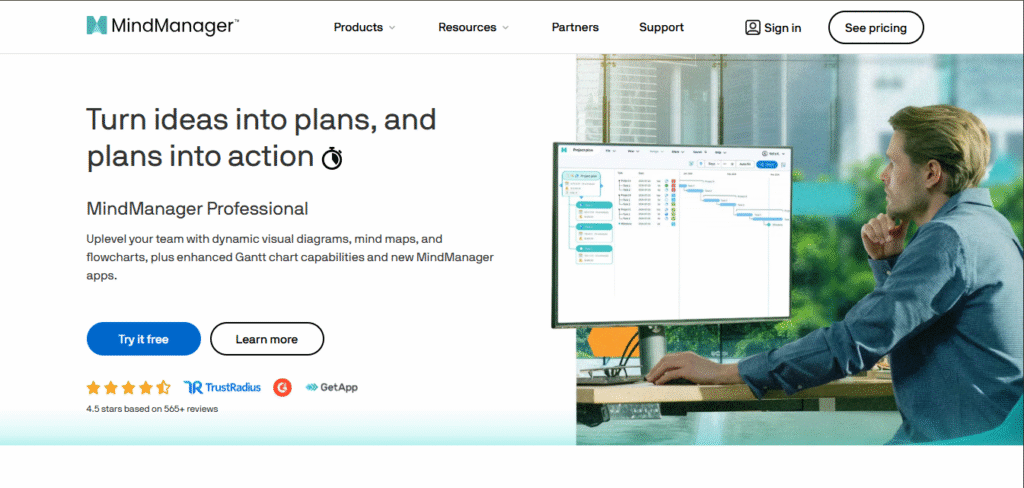
MindManager is a robust mind mapping and visual productivity software that is meant to assist individuals and teams in structuring ideas, brainstorming, and minimizing workflows. It was developed by Corel and is used to convert complex information into easy-to-understand, interactive diagrams for improved planning, project management, and collaboration.
What is MindManager?
MindManager (by Mindjet) is a top mind mapping and visual collaboration software that helps accelerate productivity, brainstorming, and project planning. Employed by professionals, educators, and teams, it converts ideas into executable plans with simple mind maps, flowcharts, and diagrams.
Installed or Windows, Mac, and cloud, MindManager organizes thoughts, manages projects, and makes workflows visually efficient.
Why Use MindManager?
✅ Visualize Ideas: Create interactive mind maps, flowcharts, and diagrams.
✅ Increase Productivity: Project plan, goal setting, and visually track progress.
✅ Collaborate Easily: Collaborate easily with others and share and edit maps in real-time.
✅ Connect with Tools: Ties in with Microsoft Office, Teams, and cloud apps.
Key Features of MindManager
Essential Mind Mapping Tools
Drag-and-Drop Interface: Quick mind map creation and editing.
Multiple Layouts: Tree maps, org charts, timelines, and swimlanes.
Custom Styling: Themes, colors, and icons for clear visuals.
Collaboration & Integration
Real-Time Co-Editing: Cloud-based collaboration (via MindManager Web).
Microsoft Office Integration: Sync with Outlook, Teams, Word, and Excel .
Cloud Storage: Save to OneDrive, Dropbox, or Google Drive.
Productivity Boosters
Task Management: Set deadlines, priorities, and track progress.
Gantt Charts: Transform maps to project timelines.
Smart Rules: Automatically format maps according to conditions

MindManager Pros and Cons
Pros
- MindManager’s visual tools are super powerful, letting you create mind maps, flowcharts, Gantt charts, and SWOT diagrams with ease.
- The drag-and-drop interface is customizable, and you can choose from a range of templates to get started.
- It integrates seamlessly with Microsoft 365 and syncs with popular cloud storage services like OneDrive, Dropbox, and Google Drive.
- Collaboration is a breeze, with real-time co-editing, commenting, and task assignments.
- You can access your work on desktop, web, or mobile (although mobile is view-only).
Cons
- MindManager can be pricey: the web-only Essentials plan costs from about $99 per year, Professional (desktop apps for Windows and Mac plus web) from about $179 per year, and a one-time desktop licence from about $369.
- It can take some time to learn all the advanced features, like Gantt charts and Smart Rules.
- The mobile app is read-only, so you can’t edit on-the-go.
- There’s no monthly billing option, which might be a drawback for some users.
- If you’re a casual user or freelancer, you might find MindManager a bit too robust and expensive, and might prefer simpler tools like Miro or Lucidspark.
MindManager Pricing Plans And Annual Subscription Plans
| Plan | USD/year | INR/year | Key Features |
|---|---|---|---|
| Essentials | From about $99 | ₹8,220 | Core mind maps, multiple diagrams & layouts, basic project/task management, online support, web version only (no desktop apps) |
| Professional | From about $179 | ₹15,498 | Everything in Essentials + advanced project tools, co‑editing, Chromebook, desktop apps for Windows/Mac, improved sharing & publishing |
| Enterprise | Contact for pricing | — | Professional features + SharePoint Linker, IT admin portal, SSO, volume licensing, premium support, training, and large‑scale deployment |
USD prices are approximate, based on third-party listings checked in September 2026. MindManager’s official pricing page shows prices including VAT, which vary by region and change with promotions, so check it for the current price.
MindManager FAQs
Q: Is MindManager Free?
No, but it has a 30-day free trial (all features). No permanent free plan.
Q: Is MindManager Worth It?
Yes, if you require professional mind mapping for work or complicated projects.
No, for non-professional use (there are cheaper options like XMind or Miro).
Q: What is MindManager Used For?
Visual thinking: Brainstorming, project planning, meeting notes, workflows.
Project management: Gantt charts, task tracking, team collaboration.
Education/Consulting: Organizing ideas, presentations, research.
Q: How Much Does MindManager Cost?
Desktop (Windows/Mac): $369 (single payment) + $179/year (updates).
Web (Cloud): $99/user/year.
Enterprise: Custom pricing.
Q: How Does MindManager Operate?
Create maps: Drag-and-drop nodes for ideas.
Customize: Insert icons, links, attachments.
Collaborate: Share/co-edit in real-time (cloud).
Export: Save as PDF, PPT, or project files.
Q: What is MindManager Used For? (Detailed)
Business: Agile workflows, strategic planning.
Education: Lesson plans, research planning.
Personal: Goal setting, tracking habits.
Is MindManager Worth It?
Yes, MindManager is beneficial for advanced mind-mapping and visual project planning tools. Furthermore, it excels in brainstorming sessions, organizing multifaceted concepts as well as collaborating with various teams, but it does come at a higher price than simpler alternatives like XMind or FreeMind.
Worth it for: Professionals with significant experience, project managers, and teams that require more advanced features will benefit. Not ideal for: Leisure users and budget constrained individuals.
Final Verdict
MindManager is a robust mind-mapping software with advanced features suitable for professionals, project leaders, and teams requiring sophisticated collaboration and visualization. However, its pricing is on the higher side, which may not suit casual users or those with simpler requirements. For users who require extensive organizational systems and integration with tools such as Microsoft Office, the investment is justifiable; other users may prefer more budget-friendly options like XMind or Miro.
Related Reviews
More from Productivity & Business Software